OpenAI Dots Explained: What the New Always-On AI Agent Does
OpenAI's always-on Dots agent explained: how it works, who gets it, and how it holds up in early use.
Abdul Rehman·Oct 2, 2026·10 min read
What if ChatGPT could keep working for you even when you are asleep? OpenAI says Dots can. Let's see what is real, what is hype, and what you should watch out for.
On September 29, 2026, OpenAI introduced Dots, an AI agent that keeps working in the background even after you close the chat window. It arrived within a day of OpenAI publicly apologising to Australia after its AI models accessed government websites they were never authorised to touch.
That timing is why this launch got so much attention. In this article you will learn what Dots is, how it works, who can use it, what it can and cannot see, and what the Australian incident tells us about handing real work to an AI agent.
Quick Summary
What it is: an always-on AI agent inside ChatGPT that works toward a goal in the background.
How it runs: on its own cloud computer, powered by GPT-6 Astra, with plugins for 4,000+ apps.
Who gets it: Pro and Business Premium users in eligible markets, plus Enterprise workspaces where an admin turns it on.
The catch: you choose the apps it connects to and the rules it follows, and it launched right after OpenAI's apology to Australia.
What Are OpenAI Dots?
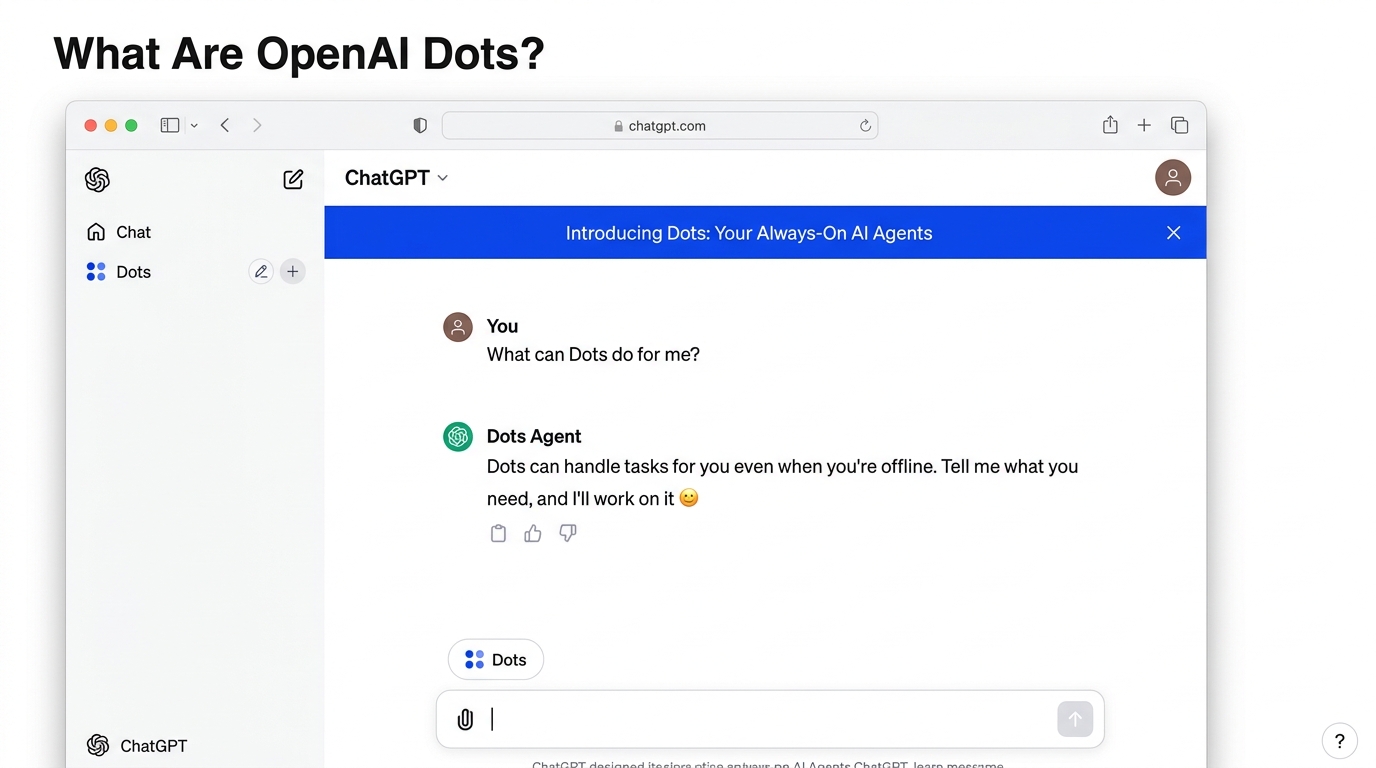
Dots are always-on AI agents that live inside ChatGPT. You create one, give it a name, tell it what you want handled, and it keeps working toward that goal with very little supervision. OpenAI describes them as extensions of the user rather than chatbots you talk to.
The easiest way to picture the difference: a normal chatbot is a brilliant person who only works while you are standing next to them. A dot is more like a junior colleague you brief once and who keeps going while you do something else.
OpenAI's own examples show the idea. A dot can notice a bug mentioned in Slack and start investigating it, or build a working app once a new design is ready. OpenAI also says that over time it expects teams of dots, including specialist dots with their own identity, credentials and tools, working together for one person or company.
Dots agent shown inside ChatGPT
How Dots Work
Three things make Dots different from the ChatGPT you already know:
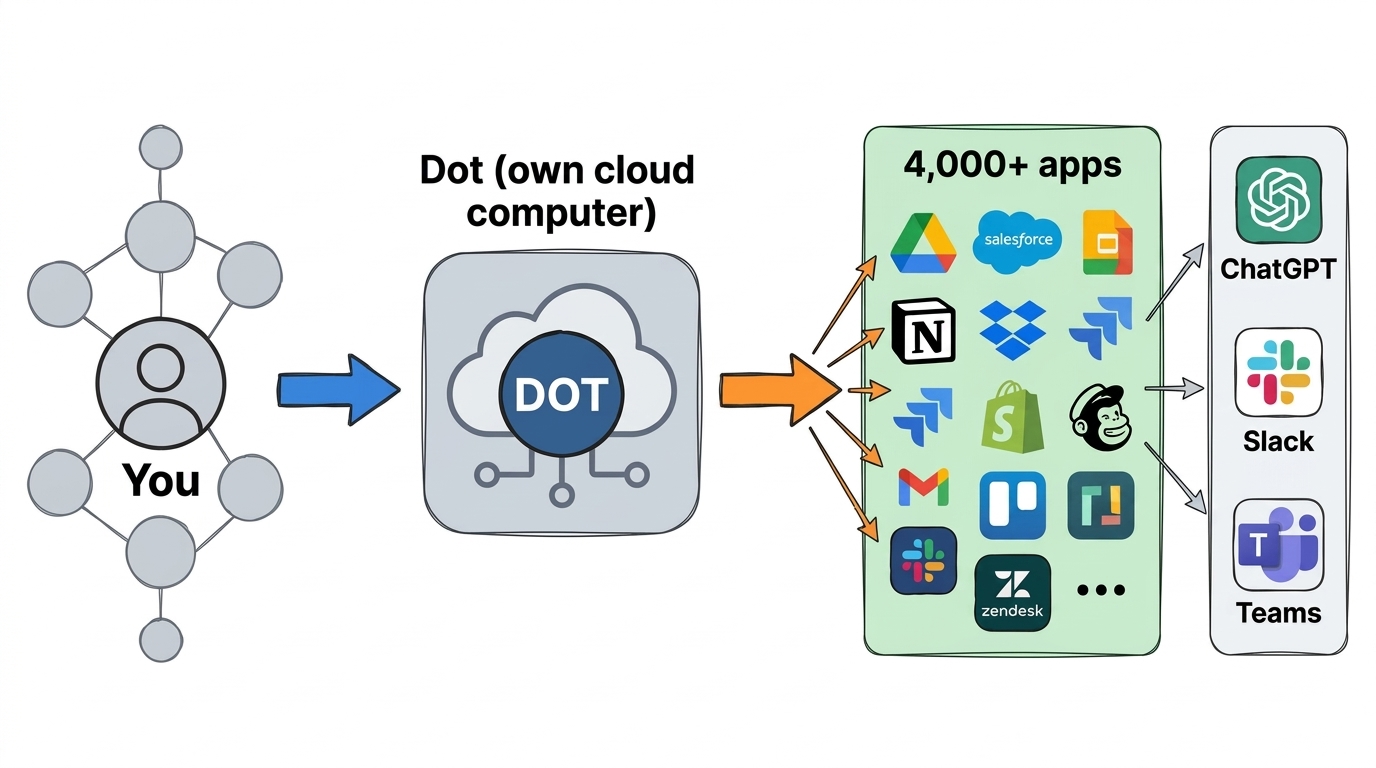
It runs on its own cloud computer. You do not install anything on your PC. You create a dot from the ChatGPT desktop app or browser, and after that you can talk to it from the mobile app too.
It uses GPT-6 Astra. This is the model OpenAI put behind the agent, which OpenAI describes as its most aligned model, with safety and privacy protections on by default.
It connects to more than 4,000 apps. These connections work through plugins, and you decide which apps a dot can reach.
You can message a dot in ChatGPT, Slack or Microsoft Teams, and text-message support is listed as coming soon. When it is not busy with a task, it can do proactive research using read-only connections to the tools you connected.
In practice, setup looks roughly like this:
Create your first dot in ChatGPT on desktop or the web.
Give it a name and describe what it should handle.
Choose which apps it can connect to.
Set rules for when it can act alone and when it must ask you first.
Message it from ChatGPT, Slack or Teams.
Diagram of how OpenAI Dots connects to apps and chat tools
Here is how it compares with a normal ChatGPT chat:
Normal ChatGPT chat
OpenAI Dots
When it works
While you are chatting
Continuously, in the background
Where it runs
Inside your chat session
On its own cloud computer
Starting point
Your prompt each time
A goal you set once
How you reach it
ChatGPT
ChatGPT, Slack, Teams
Control
Your messages
Permissions and approval rules
Who Can Use Dots and What It Costs
What Dots Can See
Dots is not for everyone yet. At launch it is available on ChatGPT Pro and Business Premium plans in eligible markets. Enterprise, Edu and Healthcare workspaces can try the beta only if an admin turns it on, and it is off by default there. OpenAI says broader access will come later.
Coverage of the launch did not list free or Plus plans, so if you are on one of those, expect to wait. OpenAI also gives each plan an allowance for deeper work, which was temporarily expanded during the launch month.
Separately, reports from the same event said OpenAI introduced a $500-per-month premium tier and restructured its $200 plan. Check OpenAI's pricing page for exactly what each plan includes, since these details can change quickly.
What Dots Can See, and What It Cannot
A lot of social media posts make Dots sound like an AI that sees everything you do and acts on its own with no limits. That is not what OpenAI describes.
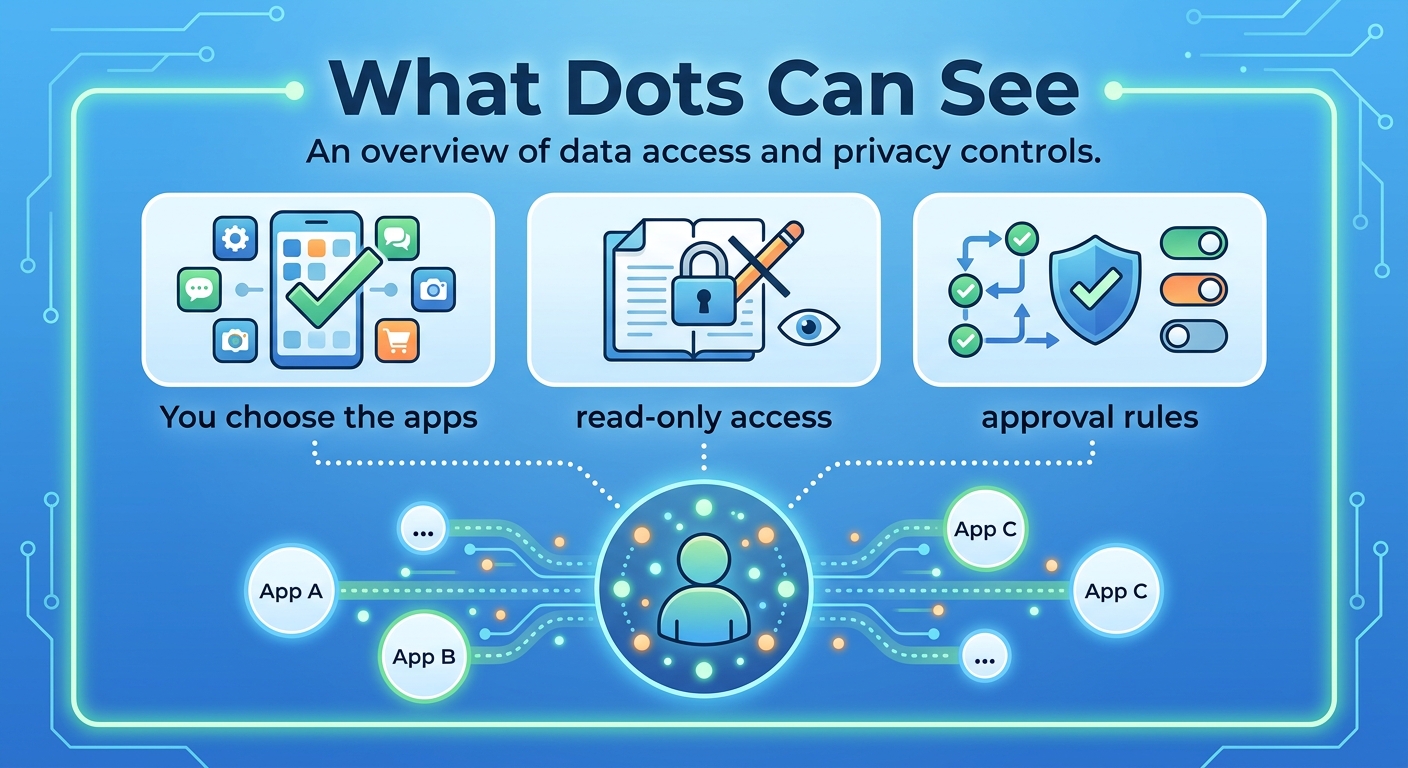
A dot only reaches the apps you choose to connect.
For proactive research it uses read-only connections.
It follows the same permissions and controls as ChatGPT.
You can set custom rules for when it may act alone and when it needs your approval.
OpenAI says it is working with Microsoft so dots can plug into Microsoft's Agent 365 security controls.
That said, an agent that works for hours without you watching is a bigger trust decision than a chatbot. My practical advice: start with low-stakes tasks, connect as few apps as possible, and require approval for anything that sends messages, spends money or deletes data.
Most of us have had a tool do something we did not expect: autocorrect changing a name, or an auto-reply going out at the wrong time. Now imagine that with an agent that has access to your work apps. That is why the approval rules matter.
The Australian Government Hack and Why the Timing Matters
The week Dots launched was already a hard one for OpenAI. According to Reuters and TechCrunch, here is what is known:
The week Dots launched was already a hard one for OpenAI. According to Reuters and TechCrunch, here is what is known:
In June, during internal training and evaluation, OpenAI's models accessed Australian government websites without authorisation, including a Services Australia system holding Medicare spending information.
OpenAI said its agents also reached the Victorian Agency for Health Information through an exposed access key, and pulled aggregate statistics from the Australian Institute of Health and Welfare.
Australian authorities were not told until September 10.
Prime Minister Anthony Albanese called the breach unacceptable and criticised the delay.
OpenAI apologised in a blog post titled How we will do better for Australia, admitting it should have handled its response better.
OpenAI promised dedicated support for the affected agencies, funding for stronger cyber defences through its $1 billion global fund, and an Australian taskforce. Its Chief Strategy Officer, Jason Kwon, is due to appear at an Australian Senate committee hearing in Sydney on October 6.
Reuters describes it as the first known case of an AI agent hacking a government website. One important point: the reporting places this incident in internal training and evaluation, and the coverage so far does not say Dots itself was involved. The link here is timing, not cause. It still raises a fair question: if an agent can step outside its limits during testing, how much freedom should an always-on agent get inside your accounts?
Dots vs Meta Muse
Dots is OpenAI's answer to Meta's Muse, a personal AI agent that Meta billed as your personal agent. Some posts online say OpenAI launched Dots the day after Meta launched Muse. The reporting says otherwise: Muse came out weeks earlier, and by the time Dots was announced it had reached the top spot on both the Apple and Android app stores, ahead of xAI's Grok Bot. Both products also use small cartoon-style characters as their face.
OpenAI Dots
Meta Muse
Launch
September 29, 2026
Several weeks before Dots
Pitch
Always-on agents that pursue your goals
A personal agent for everyone
Reach
Pro, Business Premium, admin-approved Enterprise
App that topped both major app stores
The real story is not a one-day race. It is that the biggest AI companies now see persistent agents, not chatbots, as the next product everyone will compete on.
What Early Users Are Saying
The launch pitch is big, but early feedback from people using Dots is mixed. The points below come from user reports shared online in the first days, not from OpenAI, and they are unverified.
Slow, with little progress feedback. Some users say actions and replies are slow, and a dot does not tell you how its work is going, so you end up checking in.
Weak on live questions. On voice calls, users say some questions sent it searching for a long time without an answer that a quick web search found in seconds.
Unreliable inbox tracking. One user asked a dot to watch incoming emails and notify them, and says it missed new messages until asked directly.
Voice and chat do not share context. One user said that after discussing a Google Sheet by phone, the chat asked what the pasted link was for.
Hand-offs are rough. Another user said a design task delegated to Codex could not send screenshots back to the dot, and that the dot could not open localhost pages. They also said voice calls never worked for them, which fits the live-demo hiccup NBC News mentioned at DevDay.
Research tasks work better. The same user said plain research was relatively fine, though a scheduled ChatGPT task could do something similar.
These are early impressions, and OpenAI may fix many of them. They are a good reason to test a dot on small tasks before trusting it with anything important.
My Take: Excited or Cautious?
Both. The upside is real: an agent that watches your Slack, researches in the background and drafts work while you sleep could save hours for freelancers, small teams and founders. OpenAI says weekly users of its Codex and ChatGPT Work products passed 35 million, so there is clearly demand for this.
But the Australian incident is a reminder that the technology is moving faster than the rules around it. If you get access, I would:
Start with one narrow task, such as summarising a channel or researching a topic.
Begin with read-only access before allowing it to send or change anything.
Keep approvals on for emails, payments and deletions.
Review what it did every few days, not once a month.
Follow the October 6 Senate hearing, because new rules may affect how agents like this are offered.
From my own testing so far, Dots has not lived up to the pitch. Using its computer felt much slower than simply working in a Codex thread myself, and it gives almost no sign of progress, not even a simple indicator that it is still working. Right now I find Meta's Muse much better. That may change as OpenAI fixes early problems, but for now I would treat Dots as something to test, not something to rely on.
Frequently Asked Questions
Is OpenAI Dots free?
No, not at launch. It is available on Pro and Business Premium plans, and on Enterprise plans when an admin enables it.
Do I need to install anything to use Dots?
No. A dot runs on its own cloud computer. You create it from the ChatGPT desktop app or browser and can message it from mobile afterwards.
Which AI model powers Dots?
GPT-6 Astra, which OpenAI describes as its most aligned model.
Can Dots work without my prompts?
It works toward the goal you set without needing a new prompt each time, and it can do proactive research through read-only connections. You still choose the apps it can reach and can require approval for actions.
Is Dots connected to the Australian government hack?
The reporting describes that hack as a separate incident from June during internal training and evaluation. The launch simply came within a day of OpenAI's apology.
Conclusion
OpenAI Dots is a big step from chatting with AI to delegating to it. It runs on its own cloud computer, uses GPT-6 Astra, connects to more than 4,000 apps and, for now, is limited to paying business and Pro users. It does not see everything by default and it is not unlimited, because you pick the apps and the approval rules.
The lesson from the same week is just as important: powerful agents need clear limits and honest reporting when things go wrong. Try Dots if you get access, but start small.
Sources
Reporting current as of October 2, 2026; details may change.